
AIEdAssist
AIEdAssist is a New Jersey Based Educational AI Technology Entity Oversee By Ken Jones, Who Developed His Expertise Both In the National Science Foundatoin I-CORPS Program And With His Hands-On Professional Experience As A Teacher And Technology Expert. AIEdAssist is a rebrand of the company which was the subject of the I-CORPS program, which was done to reflect the enhanced scope of the research and product offerings in the Educational AI space.
Our Vision Is To Improve The Quality And Efficiency Resident In The Higher Educational Process Via The Use Of AI Technology.
AIEdAssist Is Envisioned To Help Deliver Value To University Professors By Offering AI Services To Professors To Enhance Lecture Materials with Custom GPTs, Storytelling/Idea Mapping Technology, Training How To Create Tests And Upload Them To Canvas, Teaching Professors How To Design Courses With Generative AI Tools, To Incorporate Advanced AI Technologies Like Wolfram Into Course Offerings, To Create Integration Course Content Such As LinkedIn Learning Into Learning Management System, And To Create AI Based Voice Lectures.
We Strive To Save Professors An Amazing Amount Of Time While Also Massively Improving Their Quality Of Teaching. Please Contact Ken at kjones@aiedassist.com To Discuss How We Can Help.
Features
What are the main service components of AIEdAssist?

Lecture Presentation Improvement
We study and use several storytelling and graphics tools to help improve lectures. These tools, coupled with outstanding prompt engineering skills to mine content from existing lectures, produce tremendous improvement in lecture presentations.

Test Creation / Integration To Canvas
We are experts in prompt engineering, creation of tests in a variety of formats, the efficient conversions of the tests to QTI format, and the final import into Canvas. For AIEdAssist clients, typing in tests and manual grading is a thing of the past!

AI Voice Lecture Creation
We are experts in using MURF.AI to create complete AI voice lectures with PowerPoint slides for professors to deploy to a Learning Management System. Please scroll down to see an example of a college lecture in this format — it’s quite impressive.
SoME OF THE MANY TECHNOLOGIES WE USE TO HELP PROFESSORS






For more information on each of these technologies, please click here to view the AIEdAssist technology overview page.
Use Cases
Create An Awesome AI Voice Lecture
MURF.AI is the perfect tools to give your students next-level, YouTube like presentations. Let us show you how to do it – we have loads of actual college lectures we can demo if you are interested! Here’s just one of them for your information.
We would welcome the opportunity to meet with any professor, take a snippet of their lecture materials and build a brief 1 minute prototype lecture using MURF.AI as a proof of concept for any potential interested client.
The video above shows how editing a MURF.AI file is somewhat similar to the TikTok timeline functionality — we can add and marry up video files, lecture text, format the voice in one of many different options, and do things like alter the pace of the voice, add pauses, import text, etc. Ultimately, one of our goals is to help “teach clients to fish” so they can develop their own materials after some training as well.
The video to the left is an example of a 28 minute Nursing School video, it is quite cool, this is a great example of the type of work product we can create to help professors provide students with off-line lecture material to enhance the learning experience.
Create Tests And Import Them To Canvas. No More Typing, No More Grading!
Loading lecture materials to an AI engine, creating a test and importing it to Canvas has never been easier! It’s a hugggeee win for Professors to create a test with expert prompt engineering and then to convert a test file to a QTI format and import it to Canvas where it is automatically graded!
If you can give us just 15 minutes to discuss the process, we’ll look to delight you with our expertise and grasp of the technology!
The video to the left shows the high-level process for a Digital Marketing Exam in steps. Step 1: Create a test. Step 2. Convert the test to a QTI file. Step 3: Import the test into Canvas.
As you can see, the transactional elements of this function can be accomplished in a few minutes. Of course, the real work comes from working with professors, understanding their material and creating a comprehensive and fair evaluation using existing course material. Please contact us, we are expert at helping with that!
Improving lectures with storytelling graphics
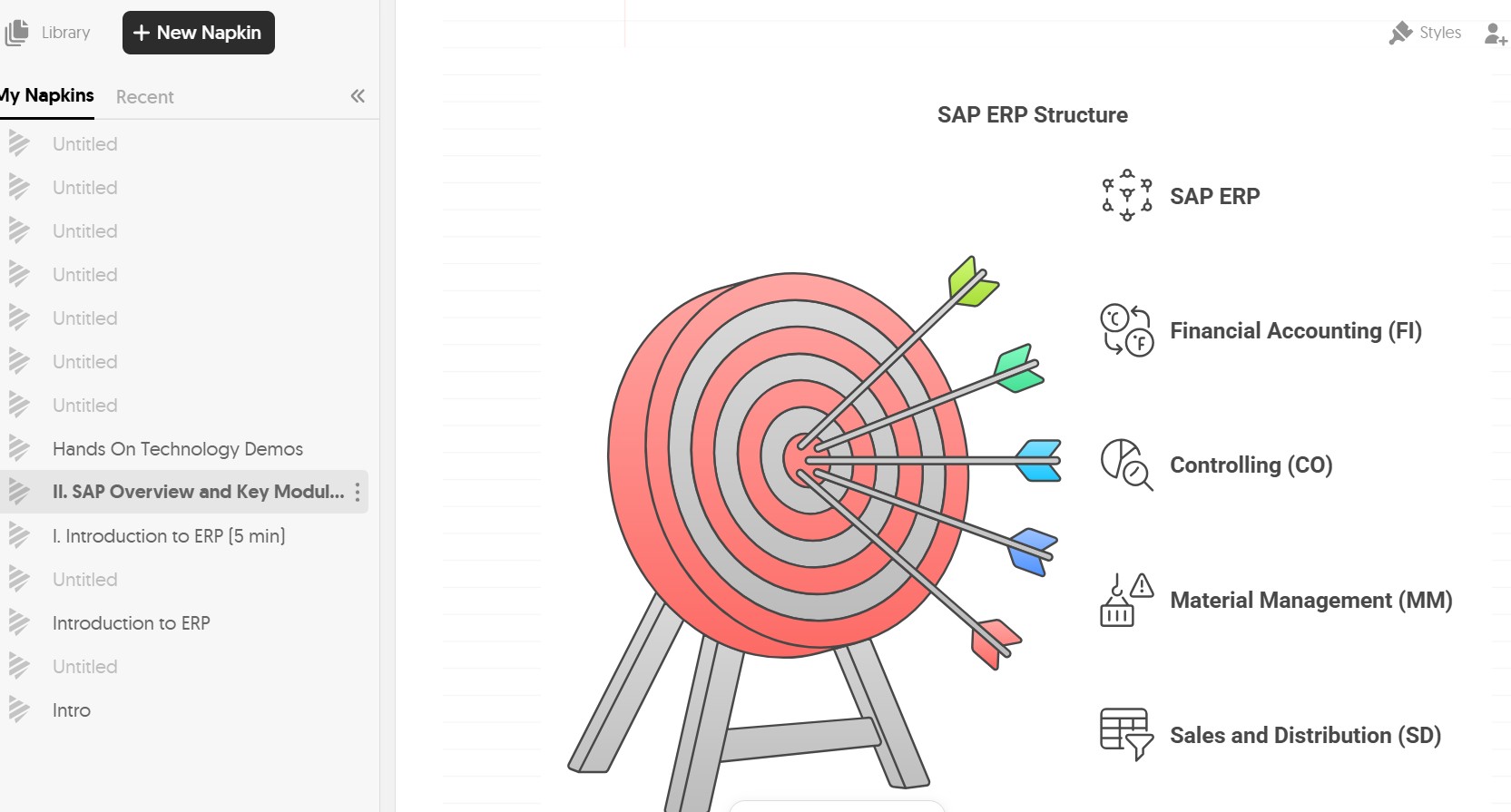
We use many products (and we believe we are experts at it), here’s an example of how you can use Napkin.AI to massively improve a graphic on ERP technology. Contact us, we’d love to help you amaze your students like we do, it’s amazing how much the insertion of 4-6 really cool graphics for a lecture can help spice things up.
To the right, please see a simple 1 minute video on how to create a graphic appropriate for use in a lection — the video shows the prompt, the various options which are generated, how to change options for some of the elements on the graphic, and finally how to export the file into one of various different formats a professor can use to insert this into a lesson plan or lecture. We hope the video helps visualize how this technology is transformative for improving the quality of a professor’s material and teaching.
Why Should You Consider Working With AIEdAssist?
I-CORPS Program
Ken completed the National Science Foundation I-CORP Propelus Program (AI Track) at Princeton University in 2024.

Tech Leadership
Ken is a well-informed industry thought leader in AI, having served as Educational Co-Chair of a major tech conference in 2024 and 2025.

Education Experts
Those working in this entrepreneurial endeavor have skills and are experts in education related artificial intelligence and related technologies.

FOR ALL STAKEHOLDERS – THOUGHT LEADERSHIP
Here are some links to articles, which are LinkedIn. In addition to these featured topics, other articles on topics such as EdTech grant writing, the use of Wake Words in ChatGPT, and some topical articles on how AI can level up a professor’s life, offering productivity and creativity to their work and sanity to their life will also be published In June 2025. We hope you enjoy and benefit from our thought leadership work.
Article – Analysis Of Storytelling And Idea Mapping AI Graphics Tools
Kenneth Jones
Article 2 – Analysis of Different Versions Of Common ChatGPT Models
Kenneth Jones
Article 3 – Analysis of Various Exciting Text-To-Voice AI Tools In The Marketplace Today
Kenneth Jones
 AIEdAssist